Auto-Stacker Wiki / Überblick
Auto-Stacker
Perfektes Focus Stacking, vollautomatisiert.
Perfect Focus Stacking, fully automated.
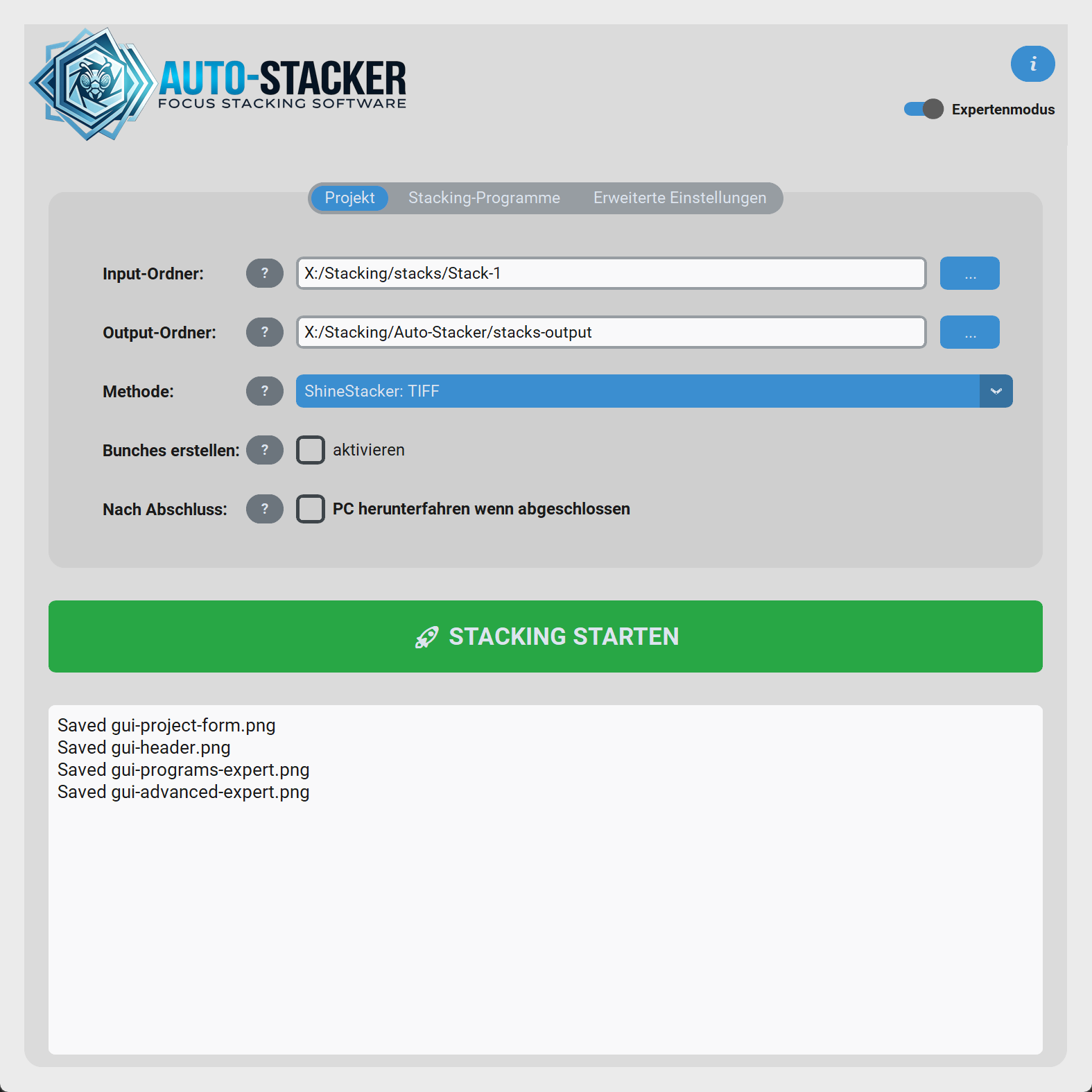
Diese Dokumentation erklärt die moderne Auto-Stacker-Oberfläche, die verfügbaren Stacking-Engines, den internen Verarbeitungsablauf und die wichtigsten Einstellungen.
Das Programm nimmt dir das manuelle Sortieren tausender Fotos sowie die Auswahl der Stapel ab und automatisiert den gesamten Stacking-Prozess.
This documentation explains the modern Auto-Stacker interface, the available stacking engines, the internal processing workflow, and the most important settings.
The application saves you from manually sorting thousands of photos and manually selecting stacks, fully automating the entire stacking process.
Was Auto-Stacker für dich übernimmt
What Auto-Stacker does for you
Lade einfach einen ganzen Ordner voller RAW- oder TIFF-Bilder. Auto-Stacker sortiert sie automatisch, erkennt zusammengehörige Stacks, filtert unscharfe Randbilder heraus und übergibt die bereinigten Bilder an die passenden Stacking-Programme.
Simply load an entire folder full of RAW or TIFF images. Auto-Stacker sorts them automatically, detects related stacks, filters out blurry edge images, and hands over the cleaned images to the appropriate stacking programs.
Automatische Stapel-Erkennung
Automatic Stack Detection
Bilder werden dank EXIF-Zeit präzise sortiert. Neue Stacks entstehen automatisch, wenn die Zeitlücke zwischen zwei Fotos den von dir konfigurierten Grenzwert überschreitet.
Images are precisely sorted thanks to EXIF time. New stacks are automatically created when the time gap between two photos exceeds the threshold you configured.
Trimmen unscharfer Bilder
Trimming Blurry Images
Vor dem Stacking analysiert die App die Schärfe. Unscharfe Bilder, die beim Annähern ans Motiv entstehen, werden automatisch abgeschnitten, bevor die Stacking-Engine startet.
Before stacking, the app analyzes sharpness. Blurry images taken while approaching the subject are automatically cut off before the stacking engine starts.
Beliebige Engines
Any Engines
Unterstützt ShineStacker, Helicon Focus und Zerene Stacker. Du kannst sogar Vergleichsmodi nutzen, um das beste Ergebnis zu finden. Metadaten werden automatisch via ExifTool erhalten.
Supports ShineStacker, Helicon Focus and Zerene Stacker. You can even use comparison modes to find the best result. Metadata is automatically preserved via ExifTool.
Der typische Ablauf
The Typical Workflow
1. Eingabe wählen
1. Choose Input
Quell- und Zielordner festlegen. Eine Verarbeitungsmethode wählen, zum Beispiel ShineStacker: TIFF.
Define source and target folders. Choose a processing method, for example ShineStacker: TIFF.
2. Stacks erkennen
2. Detect Stacks
Auto-Stacker analysiert die Aufnahmezeiten in Sekundenbruchteilen und gruppiert die Bilderserien.
Auto-Stacker analyzes the capture times in fractions of a second and groups the image series.
3. Unscharfe Ränder trimmen
3. Trim Blurry Edges
Die ausgewählten Bilder werden auf Wunsch automatisch bereinigt, damit nur der scharfe Kern des Stacks an die Engine geht.
The selected images can be cleaned up automatically so only the sharp core of the stack is sent to the engine.
4. Stacken & speichern
4. Stack & Save
Auto-Stacker startet die gewählte Engine, übernimmt die Ergebnisse und bewahrt wichtige Metadaten.
Auto-Stacker launches the selected engine, collects the results, and preserves important metadata.