Schnellstart Quickstart

In wenigen Schritten zum fertigen Stack.

A finished stack in just a few steps.

Für den Einstieg reicht der einfache Modus im Projekt-Tab vollkommen aus. Wähle deine Ordner, entscheide dich für eine Stacking-Methode und überlasse dem Programm den Rest.

For starters, the simple mode in the Project tab is completely sufficient. Choose your folders, decide on a stacking method and leave the rest to the program.

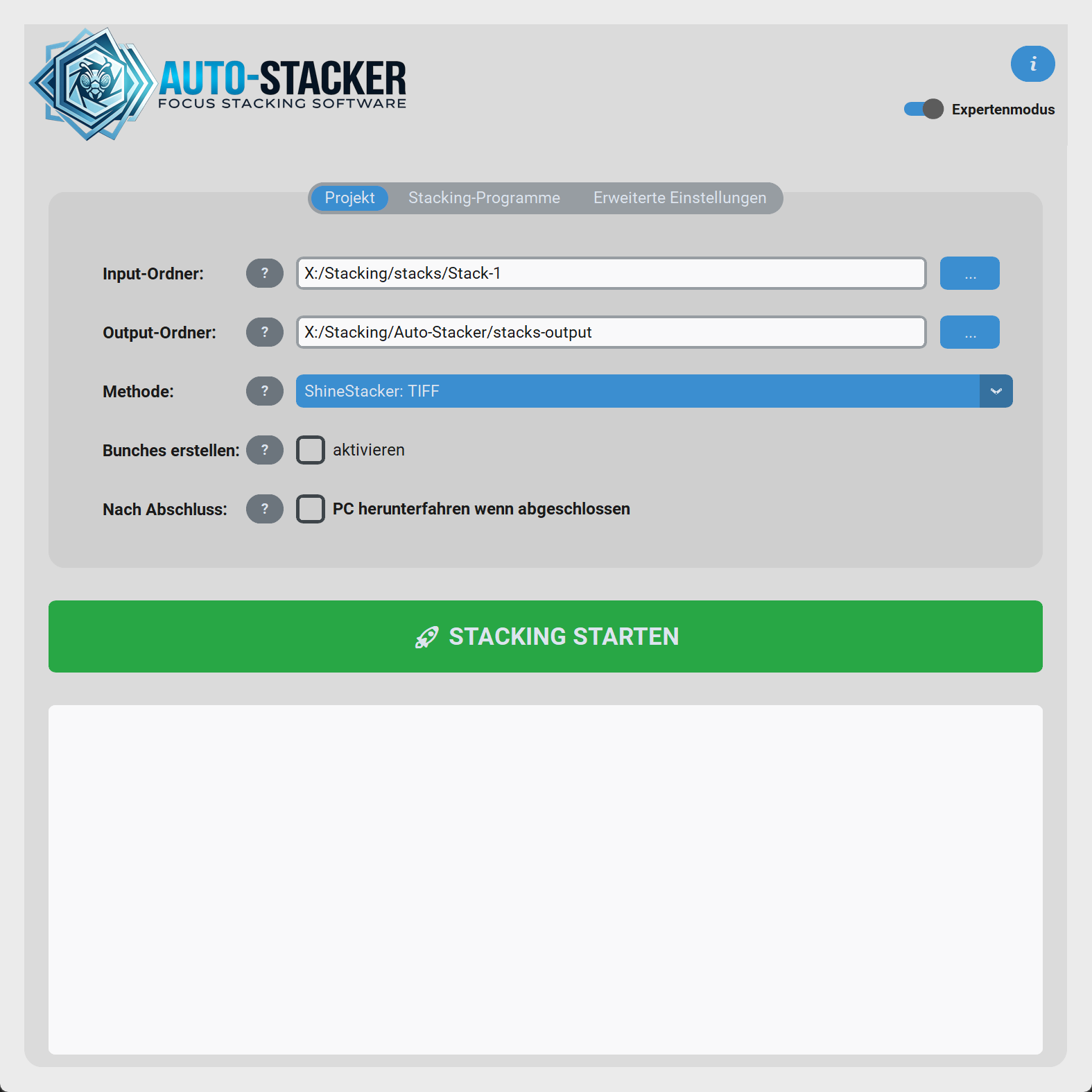
Startbereich der Auto-Stacker GUI

Voraussetzungen für den ersten Lauf

Requirements for the first run

Mindestens eine Engine

At least one Engine

Ohne Programm zum Stacken kann Auto-Stacker keine fertigen Bilder berechnen. Du kannst Shine Stacker direkt im Expertenmodus der GUI mit einem Klick installieren. Helicon und Zerene bindest du über ihre .exe ein.

Without a stacking program, Auto-Stacker cannot calculate finished images. You can install Shine Stacker directly via the GUI's expert mode with one click. Helicon and Zerene are linked via their .exe path.

Bilderordner (Input)

Image Folder (Input)

Unterstützt werden alle modernen RAW-Formate (.arw, .nef, .cr2, .cr3, .dng...) sowie gängige .tif und .tiff Dateien. Lege alle Fotos unsortiert in einen Ordner – das Programm regelt den Rest.

Supported are all modern RAW formats (.arw, .nef, .cr2, .cr3, .dng...) as well as common .tif and .tiff files. Put all photos unsorted into one folder – the program handles the rest.

Empfohlener Ablauf

Recommended Workflow

  1. Input-Ordner wählen:Select Input Folder: Klicke auf "..." und wähle den Ordner mit deinen RAW/TIFFs. Click on "..." and select the folder with your RAW/TIFFs.
  2. Output-Ordner wählen:Select Output Folder: Hier werden die fertigen `stack_XXX_...` Bilder abgespeichert. The finished `stack_XXX_...` images will be saved here.
  3. Methode wählen:Select Method: Zum Einstieg ist Shine Stacker: TIFF sehr empfehlenswert und robust. To get started, Shine Stacker: TIFF is highly recommended and robust.
  4. Optional: Bunches aktivieren, falls dein Stack hunderte Bilder umfasst oder dein PC wenig Arbeitsspeicher (RAM) hat. Optional: Enable Bunches, if your stack contains hundreds of images or your PC has low memory (RAM).
  5. STACKING STARTENSTART STACKING klicken. Du siehst nun live im schwarzen Infobereich, was Auto-Stacker gerade tut. click. You will now see live in the black info area what Auto-Stacker is currently doing.

Einstellungen werden gemerkt!

Settings are remembered!

Alle Einstellungen, die du hier triffst (inklusive Pfade zu Helicon oder Zeit-Grenzwerte), merkt sich das Programm sofort und automatisch in einer settings.json Datei.

All settings you make here (including paths to Helicon or time limits) are immediately and automatically remembered by the program in a settings.json file.

Bitte das Fenster nicht schließen

Please do not close the window

Schließe das Hauptfenster nicht, solange unten noch der Ladebalken läuft. Die Verarbeitung im Hintergrund bricht sonst hart ab.

Do not close the main window as long as the loading bar at the bottom is still running. Background processing will otherwise break hard.